
Supplier portal: from purchase order to validated invoice, without chasing emails
Your supplier logs into its own portal, confirms the purchase order, uploads the CFDI XML linked to that order and sees when it will be paid. Procurement and Accounts Payable receive invoices already validated, through the portal, API or SFTP.
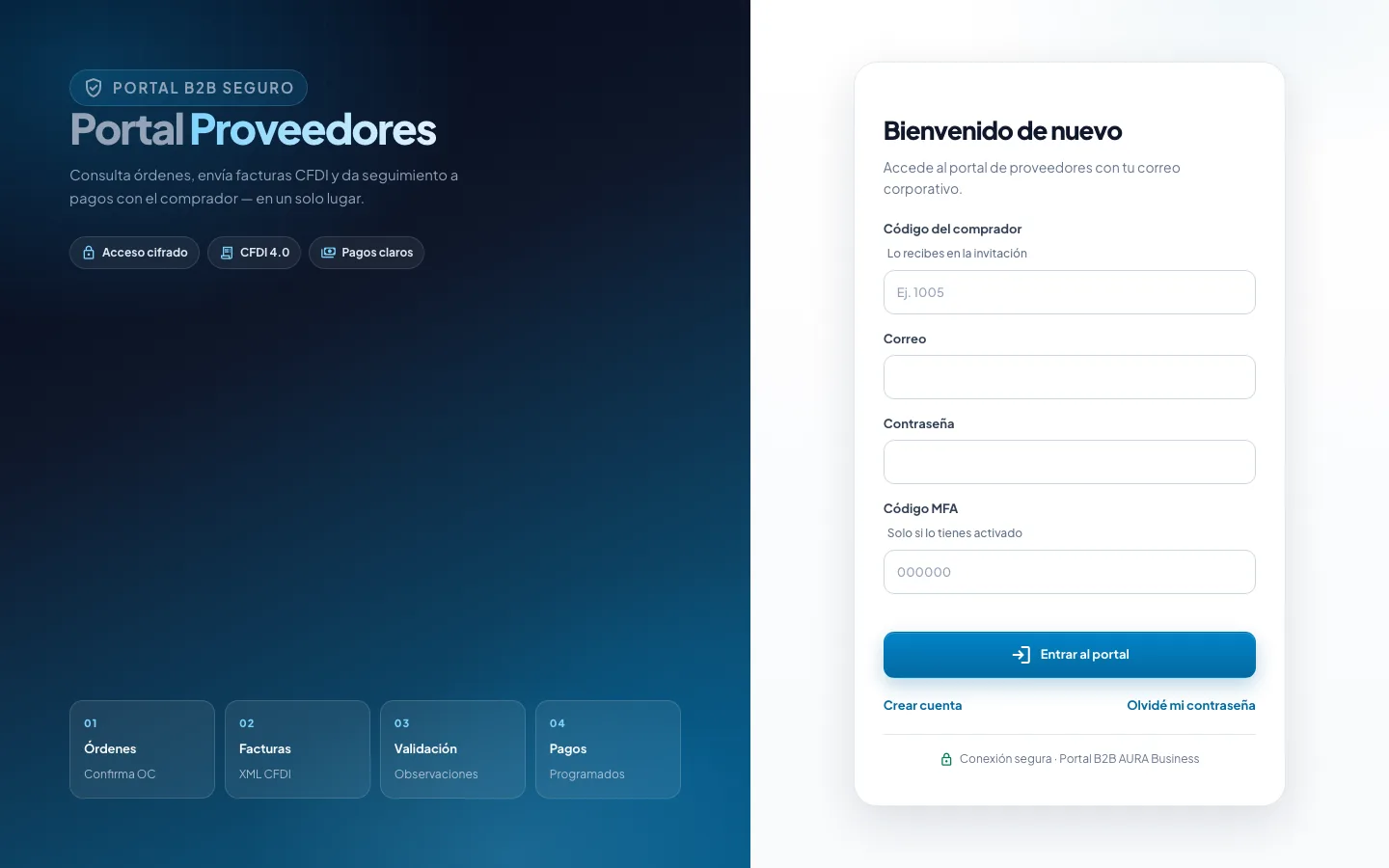
What happens when invoices arrive by email
Orders without acknowledgment
The order goes out as an attachment and nobody confirms whether the supplier received or accepted it.
Invoices without an order
CFDIs arrive that match no order, with amounts or details that do not add up.
Calls about payment
The supplier does not know whether its invoice was approved, flagged or scheduled.
Scattered onboarding
Tax certificate, bank details and legal representative documents spread across inboxes and spreadsheets.
The journey, from invitation to payment
This is how we teach it in the “Supplier portal” path of our user academy.
- Catalog entryProcurement registers the supplier: tax ID (RFC), tax regime and payment terms. This is the counterparty record.
- Invitation and accessThe company invites the supplier’s users or accepts their request. Suppliers never access internal systems.
- Onboarding reviewThe supplier uploads its tax status certificate and documents; the company approves them or asks for corrections.
- Purchase orderA contract period is released or a standalone order is issued. Issuing it publishes it on the portal.
- ConfirmationThe supplier confirms the issued order. Without an accepted or issued order, the portal will not let it attach an invoice.
- Linked invoiceThe supplier uploads the CFDI XML for that order, one by one or in a ZIP batch. The PDF is optional.
- ValidationThe company reviews the intake queue (portal, API or SFTP): approve, flag or reject with a reason.
- Visible paymentThe valid invoice moves to Accounts Payable. The supplier can see scheduled and paid amounts.
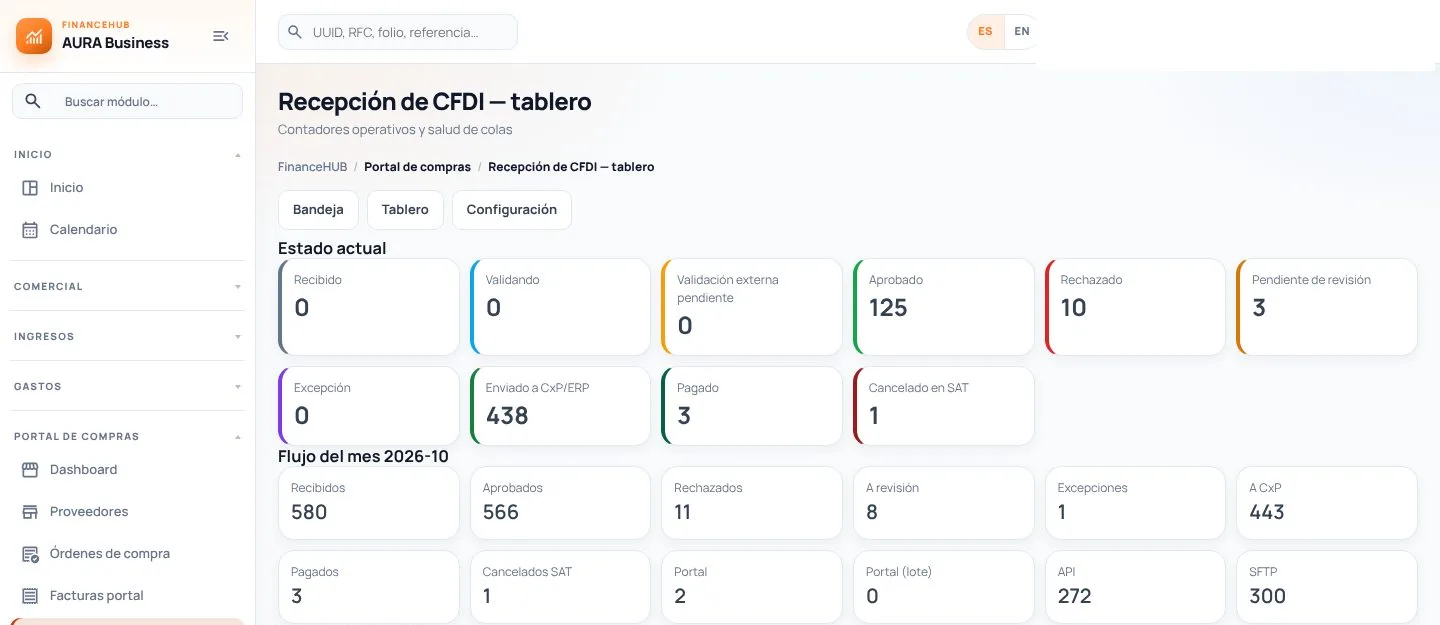
Portal and CFDI intake screens
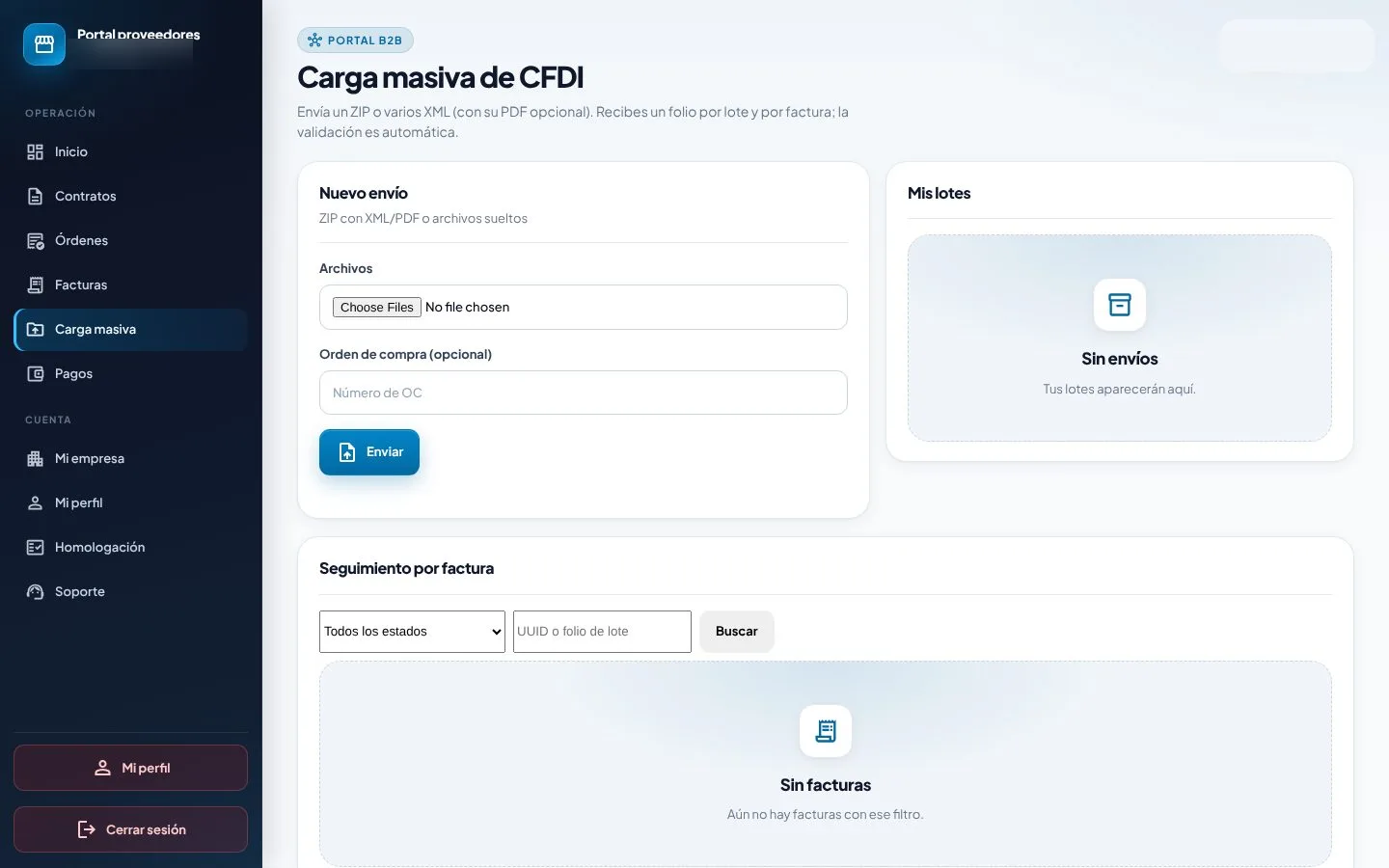
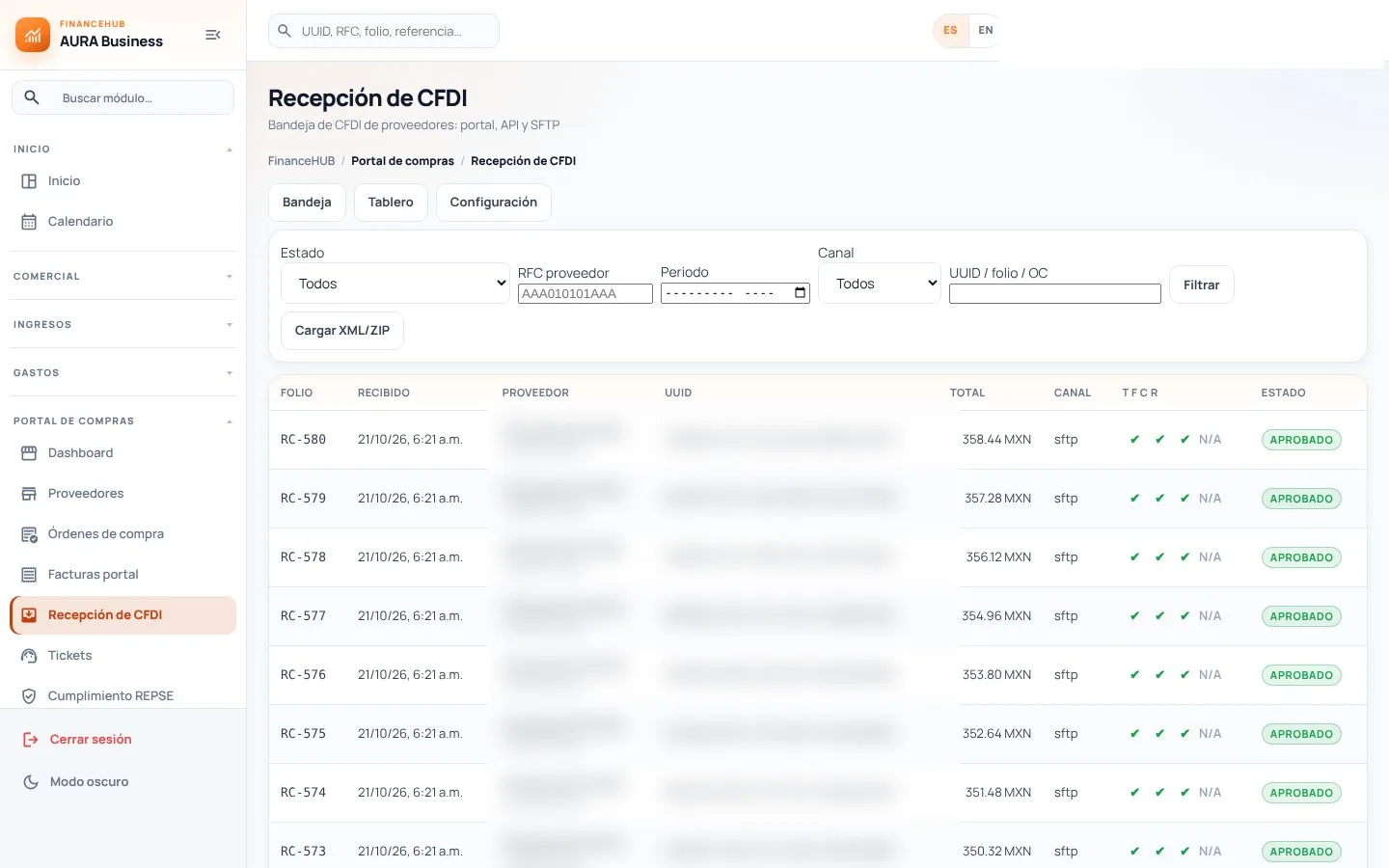
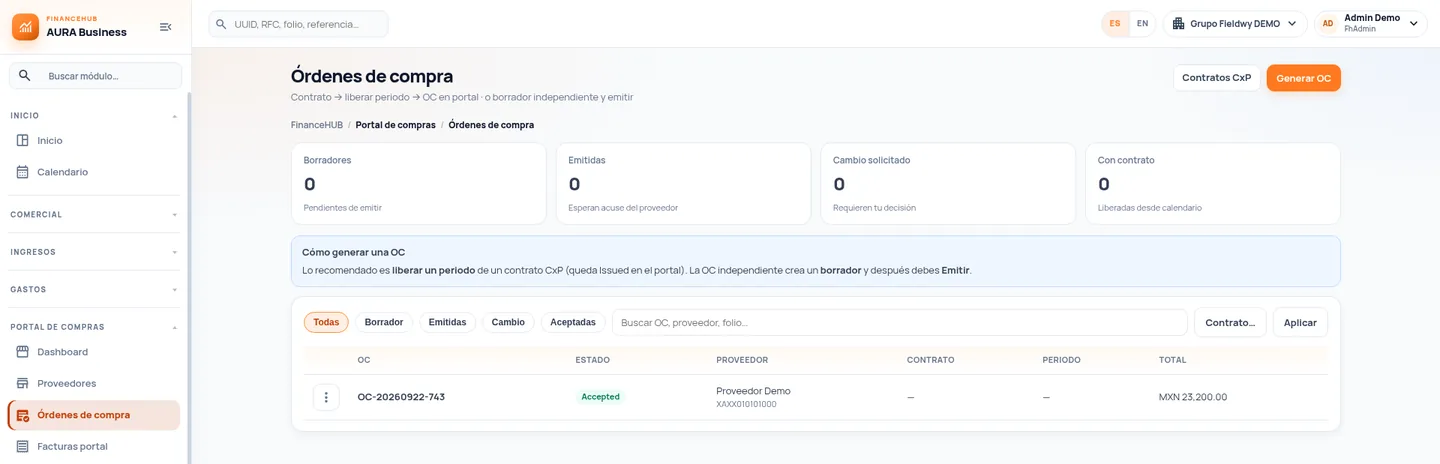
Procurement, suppliers and Accounts Payable in one process
Supplier catalog and profile
Legal name, tax ID, regime, payment terms and AP balance in one profile.
Purchase orders with statuses
Draft, issued, change requested and accepted; each order is linked to its contract and period.
Multichannel CFDI intake
Portal, API or SFTP in one queue, with folio, channel, status and reason.
Validation before payment
XML structure, recipient data, link to the order and invoice status.
Supplier tickets
Every question or issue with a ticket number and a response, outside email.
Portal audit log
Who suspended an account or rejected an invoice. Events cannot be edited or deleted.
What changes in day-to-day operations
- Fewer emails and callsSuppliers can see the status of their order, invoice and payment.
- Invoices that matchThe CFDI arrives linked to an accepted order, not on its own.
- A cleaner closeAccounts Payable receives validated invoices, not files to review.
- Audit-ready traceabilityEvery approval, rejection and change is recorded.
Teams that gain control
- Procurement: confirmed orders and suppliers onboarded with complete documents.
- Accounts Payable: invoices validated against the order before booking.
- Treasury: payment scheduling based on reliable information.
- Tax: CFDI 4.0 invoices with the correct recipient data.
- Suppliers: one place for orders, invoices and payments.
What clients usually ask
Another question? Use the form on this page.
What does a supplier need to log in?
An invitation from your company or an approved request. Each user has individual access; accounts are never shared between suppliers and suppliers never access internal systems.
Can a supplier upload only the PDF?
No. The tax document is the CFDI XML; the PDF is its printed representation and is accepted as a complement. Validation runs on the XML.
What if the invoice does not match any order?
The portal only lets the supplier attach the CFDI to an accepted, issued or partially accepted order. If no order is ready, the right order is requested or the invoice is returned with a note.
Which recipient details must a CFDI 4.0 include?
Tax ID (RFC), name or legal name, tax regime and postal code of the recipient’s tax address, plus the CFDI use code. Since April 1, 2023, version 4.0 is the only valid version (SAT Annex 20; Federal Tax Code, art. 29-A).
Through which channels can invoices arrive?
Through the portal (one by one or in a ZIP batch), via API or via SFTP. All of them land in the same intake queue with the channel identified.
Does the portal check SAT lists?
It can cross-check the supplier’s tax ID against the list of taxpayers presumed to report nonexistent transactions (Federal Tax Code, art. 69-B) as a risk alert. It is an informational check; the decision is your team’s.
Does it connect to our ERP?
Yes. Suppliers, purchase orders, validated CFDIs and payment status are exchanged through APIs, web services or SFTP.
Does the portal also handle REPSE?
When the service is specialized, an invoice received through the portal also goes through the REPSE portal before payment. They are separate modules that share the supplier and the invoice.
For information only; this is not legal or tax advice. Regulatory references cite Mexican law in force as of November 2026 (Federal Labor Law, Social Security Law, INFONAVIT Law, Income Tax Law, VAT Law and Federal Tax Code) and the official STPS, IMSS, INFONAVIT and SAT portals. Specific obligations depend on each contract and should be confirmed with your advisor. Screens show demo data.
Tell us how you operate today
A specialist reviews your case and prepares the demo around a scenario similar to yours.
- Session with a specialist in finance and compliance processes.
- Your operation as the example, not a generic demo.
- Phased scope, defined with your team.